

How to Verify Laser Cut Precision: A Step-by-Step Guide
Last Updated: 24 October 2026
Quick Summary
To verify laser cut precision, run a test card on your production material, measure kerf width at three points along a straight cut, check dimensions against your tolerance, then inspect edges for dross and striations. Follow the steps in that order, because skipping one hides the cause of any error.
- Use digital calipers rated to 0.01 mm and zero them against a known gauge before measuring.
- Cut the test card on the same material batch you will use for the real job.
- Measure kerf on straight cuts only, never on curved edges.
- Take at least three readings and check the spread, not just the average.
- Photograph each failed edge next to a ruler to build a visual record.
Table of Contents
- What Laser Cut Precision Actually Means
- What You'll Need Before You Start Measuring
- Step 1: Run a Laser Cutter Test Card
- Step 2: How to Measure Kerf Width Accurately
- Step 3: Check Dimensions Against Your Laser Cut Tolerance
- Step 4: Carry Out a Laser Cutting Quality Inspection
- Common Mistakes That Skew Your Results
- Frequently Asked Questions
What Laser Cut Precision Actually Means
Laser cut precision is the degree to which a cut part matches its intended design, measured in kerf width, dimensional accuracy, and edge quality.
Here is the part most guides skip: precision is not one tolerance. It is the sum of what your machine, your material, and your settings each contribute.
- Kerf is the width of material the beam removes.
- Dimensional accuracy is how close the finished part sits to the drawing.
- Edge quality covers striations, dross, and burn marks.
Miss any one of these and your "precise" part is not precise. Below, we show you exactly how to verify laser cut precision step by step, using a test card, calipers, and a simple inspection routine.
What You'll Need Before You Start Measuring
Gather your tools before you cut anything. A clean, flat surface and good light matter as much as the instruments.
What you'll need:
- Digital calipers, rated to 0.01 mm
- A steel ruler for quick checks
- Your laser cutter test card file
- The material you plan to use in production
- A soft brush and lint-free cloth
- A notebook or spreadsheet for recording results
- Good task lighting and a flat bench
Set your calipers to zero and confirm they read correctly against a known gauge block or a steel rule. A caliper that drifts will quietly ruin every reading you take.
Keep the same material batch for the whole test. Switching from one sheet to another mid-check introduces variation you cannot trace.
Step 1: Run a Laser Cutter Test Card
A laser cutter test card is a single cut file containing a grid of shapes, slots, and measurement marks that reveal how your machine behaves on a given material. It is the fastest way to see kerf, tolerance, and edge quality in one pass.
Run the card on the exact material and thickness you will use for real work. Cut it once, then label the piece with the date, material, and settings.
Your test card should include:
- A set of slots at known widths, such as 3 mm, 5 mm, and 8 mm
- A circle and a square for dimensional checks
- A fine comb pattern to test small features
- A straight line long enough to measure kerf cleanly
Step 2: How to Measure Kerf Width Accurately
To measure kerf width, cut a straight line or slot, then measure the gap it leaves with digital calipers. Take readings at three points along the cut and average them.
Kerf is rarely perfectly even. The beam tapers, the material varies, and speed affects how much material burns away. That is why one reading is never enough.
How to do it:
- Cut a straight slot of known design width.
- Measure the actual slot width at the start, middle, and end.
- Subtract the design width from each reading to find the kerf.
- Record all three and note the spread.
A wide spread tells you the machine or material is inconsistent. A tight spread means your settings are stable.
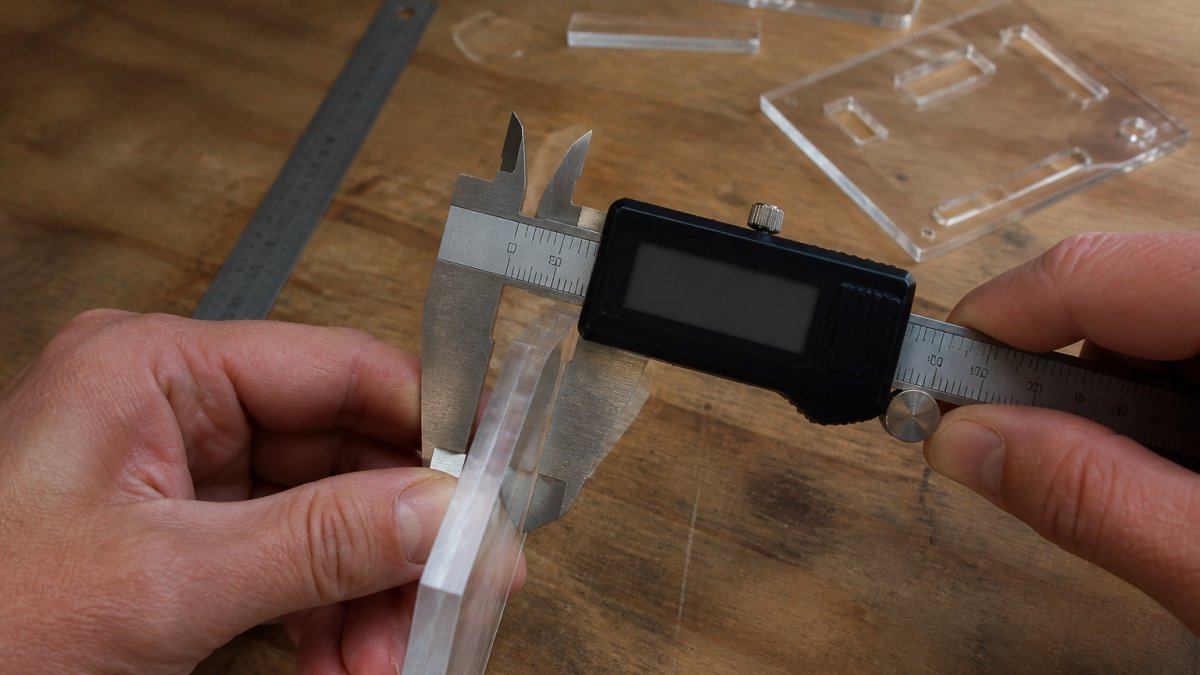
Do not measure kerf on a curved edge. Curves distort the reading because the beam approaches the material at an angle. Straight cuts only.
Step 3: Check Dimensions Against Your Laser Cut Tolerance
Laser cut tolerance is the acceptable range of variation between your design and the finished part. Check every critical dimension against that range, not against a single ideal number.
Measure the outer width, outer height, and any hole spacing on your test piece. Compare each to the drawing. Write down the difference for each.
- If a part is consistently oversized, your kerf compensation is too small.
- If it is consistently undersized, compensation is too large.
- If it varies randomly, look at material or machine stability.
Set your tolerance before you measure, so you are not tempted to move the goalposts. A common approach is to define a tight tolerance for fit-critical features and a looser one for decorative edges. For a small precision laser-cut item whose fine detail shows what good tolerance looks like, see our Stop Sign Earrings.
Step 4: Carry Out a Laser Cutting Quality Inspection
A laser cutting quality inspection is a structured check of the cut edge, not just the dimensions. Look for dross, striations, burn marks, and inconsistent kerf along the part.
Inspect under good light and, where possible, at an angle. Edge defects hide when you look straight down.
Check for:
- Dross: hardened molten material clinging to the underside
- Striations: vertical lines on the cut face that signal speed or power issues
- Burn marks: discolouration that points to excess heat
- Kerf drift: a cut that widens or narrows along its length
Run your finger along the edge with care, or use a soft brush to feel for burrs. Note anything that fails and match it back to the settings you used.
Common Mistakes That Skew Your Results
Most bad readings come from a handful of repeatable errors. Fix these and your verification gets far more reliable.
- Measuring a dirty part. Dust and dross inflate readings. Clean first.
- Using the wrong material. A test on one sheet does not carry to another.
- Skipping calibration. A drifting caliper gives confident, wrong numbers.
- Measuring curves for kerf. Straight cuts only.
- One reading instead of three. Spread matters as much as the average.
- Changing settings mid-test. You lose the ability to trace any error.
Here is a quick reference for what each problem looks like and how to fix it:
| Problem | Likely Cause | Fix |
|---|---|---|
| Part consistently oversized | Kerf compensation too small | Increase compensation |
| Part consistently undersized | Kerf compensation too large | Reduce compensation |
| Random dimensional drift | Material or machine instability | Re-run test card on fresh material |
| Dross on underside | Power or speed mismatch | Adjust settings and re-test |
| Wide kerf spread | Worn bed or dirty slats | Clean or replace bed surface |
Verifying laser cut precision comes down to discipline: test card, kerf, tolerance, inspection, in that order. Skip a step and you will chase the wrong cause. Explore our laser-cut jewellery and DIY components, and see how careful verification shows up in the finished work. Continue shopping to find a piece that fits your next project.
Frequently Asked Questions
How do you measure the accuracy of a laser-cut part?
Measure at least three points along each critical dimension with digital calipers, then compare the readings to your drawing's nominal size. Subtract half the kerf width from internal features and add half to external ones to get a true comparison. Record every reading on a simple sheet so you can spot drift over time. If any measurement falls outside your stated laser cut tolerance, the part fails and should be re-cut or the machine recalibrated before the next run.
What causes laser-cut parts to fall out of tolerance?
The usual culprits are worn or dirty lenses, a misaligned beam, inconsistent focus distance, and material that varies in thickness or density across the sheet. Feed rate and power settings that were tuned for one batch can also drift when you switch suppliers. Thermal expansion matters on larger parts, particularly in acrylic. Running a laser cutter test card at the start of each session catches most of these before they affect a customer order.
How often should a laser cutter be calibrated?
Calibrate after any mirror change, lens swap, belt adjustment or move of the machine, and run a test card at the start of every working day. For production work, a full alignment check weekly is sensible. Keep a log of each calibration with the date, the test card results and any adjustments made. That record is invaluable when a customer queries a batch, and it shows your laser cutting quality inspection process is consistent rather than ad hoc.
What should a laser-cut inspection checklist include?
Cover four areas: dimensions against the drawing, kerf width on a test coupon, edge quality (look for dross, charring and striations), and fit with mating parts. Add material batch number, machine settings and operator initials. Photograph anything borderline. A one-page checklist takes minutes to complete but gives you a defensible record if a customer disputes laser cut precision on a delivered order.
